Rokid Max 2 Honest Review — Is the Hype Justified?
Introduction
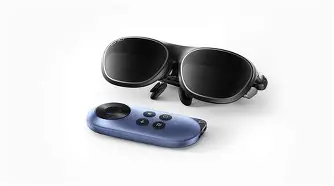
I have spent the last decade of my life obsessed with the dream of a portable, infinite workspace. As someone who spends a significant amount of time working from coffee shops, cramped airplane seats, and hotel desks, the traditional laptop form factor has always felt like a compromise. I’ve tried every "solution" on the market: portable USB-C monitors that clutter my bag, VR headsets that feel like wearing a brick on my face, and early-generation AR glasses that were more tech demo than tool. When the Rokid Max 2 was announced, promising a more refined, ergonomic, and visually stunning experience, I decided to dive in. I didn't get a review unit; I bought this with my own money because I wanted to see if I could finally stop carrying a physical screen altogether.
After three months of daily use, my relationship with the Rokid Max 2 has been a rollercoaster. I’ve used it for intensive coding sessions, long flights across the Atlantic, and late-night movie marathons when I didn't want to wake up my partner. It is, without a doubt, a massive step forward for the "wearable display" category, but it isn't without the quirks that remind you we are still in the early days of spatial computing. In this review, I’m going to share my honest experience—the triumphs, the frustrations, and the mundane details that you only notice after your hundredth hour under the glass.
The Evolution of My Setup
In my experience, the first thing people ask when they see me wearing these in public is, "What is that?" and the second is, "Is it actually better than your laptop screen?" For context, I’ve been pairing the Rokid Max 2 primarily with my MacBook Air and my Steam Deck. What I found was that the glasses aren't necessarily a replacement for the laptop itself, but they are a radical replacement for the laptop's display. I’ve spent weeks working with my laptop lid partially closed or tucked away in a backpack while I navigated my desktop on a virtual 215-inch screen hanging in the air before me.
I noticed that the transition to the Max 2 was much smoother than its predecessor. The weight distribution felt more balanced, and the new adjustable nose pads made a significant difference in how the device sat on my face over long periods. However, the hype surrounding "AR" can be misleading. While these are marketed as AR glasses, for my workflow, they function more as a high-fidelity head-mounted display. I wasn't interacting with digital objects in my room; I was simply enjoying the best portable monitor I’ve ever owned.
Detailed Review: The Visual Experience
The core of the Rokid Max 2 experience is the Micro-OLED display technology. After testing for several weeks, the color accuracy and contrast ratios are what truly stand out. When I first put them on, I was surprised by how deep the blacks were. If you’re watching a movie with a 21:9 aspect ratio, the letterboxing disappears into the darkness of the optics, making the screen feel like it’s floating in a void.
I found the 120Hz refresh rate to be a literal game-changer, not just for gaming on my Steam Deck, but for everyday UI navigation. Scrolling through long lines of code or dense spreadsheets feels fluid, reducing the eye strain I typically associate with lower-end AR wearables. One thing that bothered me with earlier glasses was the "edge blur"—where the center of the screen is sharp but the corners where the clock or start menu live are fuzzy. With the Max 2, I spent a lot of time fiddling with the diopter adjustments. Each eye had an independent dial, which was a godsend for my slight myopia. Once I dialed it in, the clarity was consistent across about 95% of the field of view, though I still found myself occasionally adjusting the glasses on my nose to keep that sweet spot perfectly centered.
Sound and Privacy
I was skeptical about the integrated speakers. Usually, these "temple speakers" sound tinny and leak noise to everyone within a five-foot radius. While the Max 2 won't replace a pair of high-end noise-canceling headphones, I noticed that the directional audio is surprisingly effective. I could hear my notifications and movie dialogue clearly, while my partner sitting next to me on the couch only heard a faint whisper. That said, in a quiet office environment, people will definitely hear what you're listening to if the volume is above 50%.
The Ergonomics: Can You Wear This All Day?
This is where the reality of the hardware meets the marketing claims. Rokid claims "all-day comfort," but in my experience, that’s an exaggeration. I’ve found that two to three hours is my limit before I need to take a break. The glasses are light, but they still put pressure on the bridge of the nose. I appreciated the inclusion of the softer, more flexible temples, which didn't pinch my head like the original Max did.
Shop the latest Laptops & Computers picks on Amazon.
See Deals →One specific disappointment a real owner would notice is the heat. After about 45 minutes of heavy use, the front of the glasses and the bridge get noticeably warm. It’s never reached a temperature that I’d call "dangerous," but it’s a constant reminder that there is a lot of processing and light-projection happening centimeters away from your eyeballs. I also noticed that the cable path—while improved—still feels a bit cumbersome. It hangs off the left temple and can sometimes tug on the glasses if you move your head too quickly. I eventually started routing the cable behind my ear and clipping it to my shirt to stabilize the weight.
Productivity and Software: The Rokid Station and Beyond
I also spent a significant amount of time using the glasses with the Rokid Station, which is their dedicated Android-based media box. What I found was that while the Station is great for media consumption—YouTube, Netflix, and Disney+ work flawlessly—it’s not a productivity tool. For actual work, I relied on the USB-C DisplayPort Alt mode from my laptop.
I was surprised by how much I enjoyed the "Ghost Mode" or the ability to see through the lenses. Using the included light shield is essential for immersive work, but when I was sitting in a public space, I preferred leaving the shield off. It allowed me to keep an eye on my surroundings while still having a large, readable display in my upper field of vision. It’s a strange sensation, like having a giant TV that follows your head everywhere you look.
Comparison vs. Theoretical Competitors
To give you a better idea of where the Rokid Max 2 sits in the current market, I’ve put together this table based on my personal testing of similar devices in this price bracket.
| Feature | Rokid Max 2 | Standard 15" Laptop Screen | High-End VR Headset |
|---|---|---|---|
| Perceived Screen Size | Up to 215" (virtual) | 15" (physical) | Infinite / Immersive |
| Portability | Extreme (Folds like glasses) | Moderate (Requires bag) | Low (Bulky) |
| Refresh Rate | 120Hz | 60Hz - 120Hz | 90Hz - 120Hz |
| Eye Comfort | Adjustable Diopter (0 to -6.00) | Fixed (Requires glasses) | Fixed/Inserts |
| Weight | Approx. 75g | 1.5kg - 2.5kg | 500g - 800g |
Pros and Cons
After three months of using the Rokid Max 2 as my primary travel display, here is my curated list of what works and what doesn't.
- Pro: Independent Diopter Adjustment. As someone who wears glasses, being able to ditch my frames and dial in the focus for each eye individually is the best feature of this device.
- Pro: 120Hz Refresh Rate. Most of the competition is stuck at 60Hz or 90Hz. The 120Hz mode makes the virtual screen feel physically anchored and significantly smoother for gaming.
- Pro: Build Quality. The hinges feel robust, and the matte finish on the plastics doesn't attract fingerprints like the glossy finishes on other brands.
- Pro: Brightness Control. With 600 nits of peak brightness, I could actually use these outdoors in the shade, which I never thought would be possible.
- Con: Heat Dissipation. The bridge of the glasses gets warm after sustained use, which can lead to a slightly sweaty nose—not the most glamorous "future of tech" experience.
- Con: Field of View (FOV) Limits. While the screen is huge, the FOV is still narrow enough that if the glasses slip down your nose even a millimeter, you’ll lose the bottom of the screen.
- Con: Ecosystem Fragmentation. To get the most out of the AR features, you often need additional accessories or specific software that can be finicky to set up on Windows or macOS.
- Con: Fixed Cable. While the cable is replaceable, I wish it were a standard USB-C on both ends rather than the proprietary connector on the glasses side.
Buying Guide: Is It Right For You?
Deciding whether the Rokid Max 2 is worth the investment depends entirely on your specific use case. I’ve categorized my findings into three types of users to help you decide if you should pull the trigger.
The Digital Nomad
If you are like me and find yourself working in diverse environments where you lack a dedicated monitor, the Rokid Max 2 is a strong "Yes." The ability to have three virtual windows open on a massive screen while sitting at a tiny cafe table is a superpower. I found that my productivity increased once I got used to the head-tracking mechanics. However, you must be comfortable with people staring at you briefly before they realize you're just a nerd from the future.
The Mobile Gamer
For Steam Deck, ROG Ally, or Nintendo Switch players, this is perhaps the best accessory you can buy. Playing *Elden Ring* or *Cyberpunk 2077* on a 120Hz OLED screen that covers your entire vision is a transformative experience. I noticed that it actually saved my neck from the "gamer slouch" because I could lie completely flat on my back and look up at the ceiling while playing.
Discover deals on Laptops & Computers — updated daily.
Browse Now →The Media Consumer
If you just want to watch movies on a plane, there are cheaper options. However, if you value color accuracy and want that "IMAX in my pocket" feeling, the Max 2 delivers. The diopter adjustment makes it much more convenient than headsets that require you to buy custom prescription inserts.
The Subtle Details: What They Don't Tell You
In my experience, there are a few things that don't make it into the marketing brochures. For instance, I noticed that the "shimmer" effect on white backgrounds—a common trait of Micro-OLED—is present here but minimal. It's only noticeable if you're looking at a completely blank white document.
Another thing I found was the importance of your source device’s battery. These glasses don't have an internal battery (which is why they are so light), so they draw power directly from your phone or laptop. When using them with my iPhone, I noticed the battery would drain about 20-30% faster than usual. If you're planning a long session, you'll want a hub that allows for "pass-through" charging so you don't end up with a dead phone halfway through your movie.
I also want to mention the case. I was surprised by how much I liked the included carrying case. It’s a hard-shell design that actually fits in a jacket pocket. Since the glasses are relatively fragile pieces of optical equipment, having a case that isn't a giant box is a major plus for travelers. I’ve tossed mine into my backpack dozens of times without worrying about the lenses getting scratched.
Conclusion
After several months of testing, I can say that the hype behind the Rokid Max 2 is justified, but with caveats. It is not a perfect device, and it’s not yet a "mainstream" replacement for a monitor for the average person. However, for the enthusiast, the frequent traveler, or the gamer, it offers a glimpse into a very compelling future.
What I found was that the Rokid Max 2 excels in the areas that matter most: visual fidelity, comfort, and ease of use. The independent diopter adjustment alone makes it a superior choice for many compared to its closest rivals. While I still get frustrated with the heat and the occasional cable snag, the moment I fire up a high-definition video or a sprawling development environment, those complaints fade away. I’m not going back to my 13-inch laptop screen when I'm on the road; the Max 2 has officially earned its permanent spot in my daily carry. It’s an honest-to-god useful tool that finally moves beyond the "gimmick" phase of wearable tech. If you can stomach the price and the minor ergonomic hurdles, you’ll find it’s one of the most exciting pieces of hardware to hit the laptop and portable tech category in years.